

When you open a classic arcade cabinet—Pac-Man, Street Fighter, or Neo Geo—you’ll find one key part: the arcade PCB. For collectors, home arcade fans, and restoration experts, understanding arcade PCBs is essential for reviving games or upgrading cabinets. This guide explains what arcade PCBs are, why their replacement or reproduction is sought after, and how to avoid mistakes when buying, restoring, or building your own.
What Is an Arcade PCB and Why Does It Matter?
An arcade PCB (Printed Circuit Board) is the main electronic board that runs the game software, processes player input, generates graphics and sound, and manages communication among all controls, the display, and the speakers inside the cabinet. Think of it as the “brain” of any arcade machine.
Most classic arcade games from the late 1970s up through the 2000s rely on these purpose-built PCBs. Each board is tailored to a specific title or game family. There are two main types:
- Dedicated PCBs: Designed for a single game (like original Donkey Kong or Pac-Man).
- Platform PCBs: Support interchangeable game cartridges or daughterboards (like Neo Geo MVS or Capcom CPS-2).
Demand for replacement or reproduction PCBs is growing. Original boards are aging, rare, or failing. Collectors and arcade bar owners want these games working, while hobbyists dream of home arcades with authentic gameplay.
Basic Anatomy of an Arcade PCB
For newcomers, it’s helpful to know what’s actually on an arcade PCB. Common components include:
- CPU (Central Processing Unit): The main processor running the game logic.
- Graphics and Sound Chips: Specialized ICs (integrated circuits) that handle video and audio output.
- Memory: RAM for game data and ROM/EPROM/Flash storing the game code.
- Voltage Regulation: Circuits that convert power supply voltages for safe operation.
- Edge Connectors: Gold-fingered connectors (like JAMMA) that plug into the cabinet wiring harness.
- I/O Circuits: Chips and traces that interface with buttons, joysticks, coin doors, and more.
Some platforms use “base boards” with plug-in cartridges or daughterboards (e.g., Neo Geo, CPS-2), which can save money and make game swapping easier.
JAMMA: The Universal Arcade Connection Standard
If you’ve researched arcade PCBs, you’ve probably heard of JAMMA (Japan Amusement Machinery Manufacturers Association). JAMMA is the industry standard edge connector introduced in 1985 that dramatically simplified swapping PCBs between cabinets.
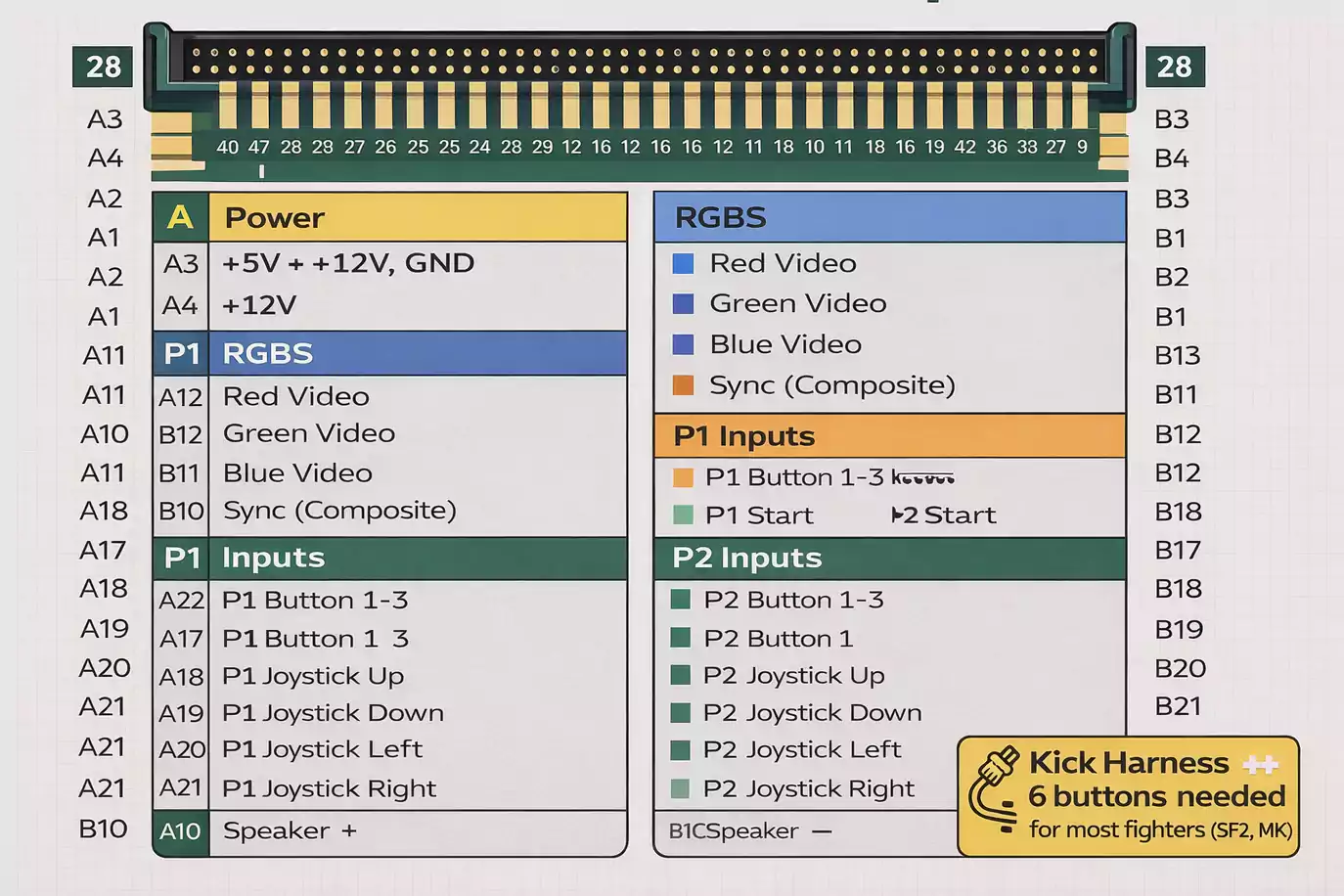
JAMMA edge connector (56-pin) handles:
- Power supply (+5V, +12V, Ground)
- Video RGB signals
- Audio output
- Player 1 & 2 controls (joysticks, up to 3-4 buttons per player)
- Coin, service, and start inputs
If your cabinet and PCB are JAMMA compatible, swapping is nearly plug-and-play. But many games, especially pre-1985 or specific fighters (like Street Fighter II with 6 buttons), require extra harnesses or have unique pinouts. Always check pinout diagrams and wiring before connecting, or risk damaging the board or controls.
- Supergun setups: For home use, many hobbyists use “Supergun” adapters that let JAMMA boards run on a TV or monitor with external power and controller hookups.
Buying Arcade PCBs: Real-World Tips and Common Pitfalls
Buying an arcade PCB—whether original, reproduction, or multi-game—can be tricky. Here are the most important points learned from arcade communities and collectors:
1. “Tested Working” Isn’t a Guarantee
Listings labeled “tested working” are a good sign, but boards can still be damaged during shipping or develop new issues if they’ve been stored poorly. Ask for clear, timestamped photos, videos of the board running, or a written return policy.
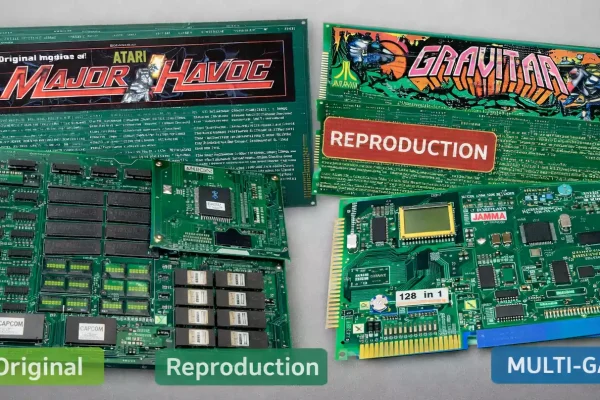
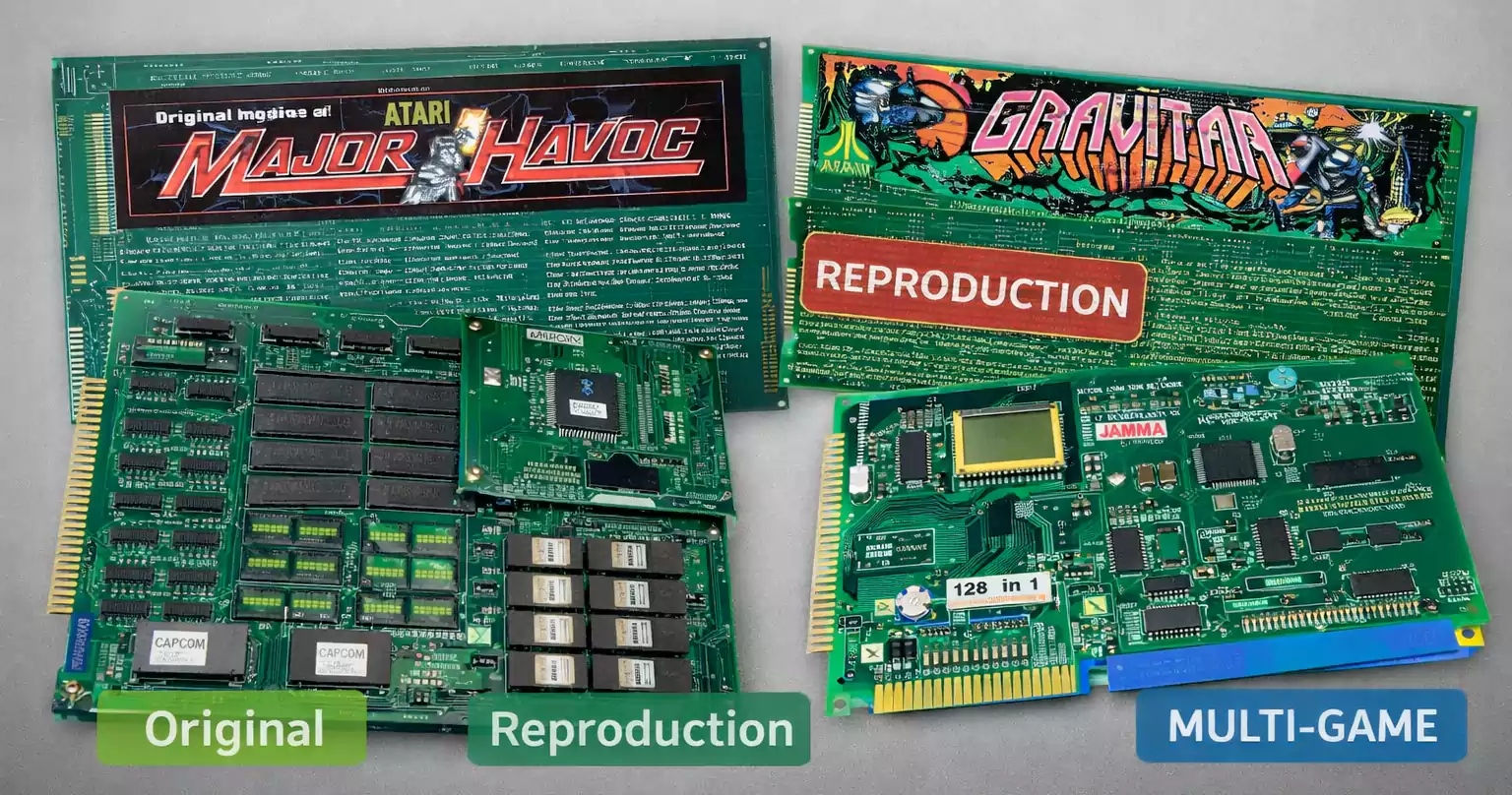
2. Original vs Reproduction vs Multi-Game Boards
- Original boards deliver the most authentic gameplay and sound, but may be expensive, fragile, or difficult to repair.
- Reproduction boards (official or community-made) are usually new, more reliable, and may fix known original issues—but authenticity and value are debated among collectors.
- Multi-game boards (like Pandora’s Box or 60-in-1 JAMMA boards) offer many games but may suffer from input lag, imperfect emulation, or altered graphics and sound.
3. Platform Ecosystems Matter
Certain arcade systems, such as the Neo Geo MVS, are popular because they support multiple games on a single motherboard and are relatively easy to maintain. Others, like Capcom CPS-2, have unique security features that sometimes require extra steps to keep games running.
Engineering Challenges with Replacement or Reproduction PCBs
If you want to build your own replacement PCB, or even commission a reproduction, here are some key engineering hurdles:
1. Power and Grounding
Arcade PCBs often require precise +5V and +12V DC power. Old or poor-quality power supplies can cause voltage drops or “ripple,” leading to lockups or video glitches. Always check your power supply and clean/repair gold-finger contacts on the PCB for reliable operation.
2. Connectors and Pinouts
JAMMA standardizes most connections, but many boards (especially pre-JAMMA or special games) use unique pinouts. Plugging a JAMMA board into a non-JAMMA harness (or vice versa) without an adapter can instantly destroy the chips. Double-check pinout charts before connecting.
3. Video and Audio Signal Compatibility
Classic arcade monitors run at 15kHz (CGA), which most modern TVs can’t handle directly. If you use a Supergun or want to connect to LCDs, you’ll need video converters (CGA-to-VGA, or upscalers). Some modern multi-game PCBs offer VGA or HDMI output, but may not look or feel the same as the original.
Audio circuits are another trouble spot. Many boards have built-in amplifiers and expect a specific speaker load. Connecting audio incorrectly can result in no sound or, worse, burnt components.
4. Security and Firmware
Some boards (e.g., Capcom CPS-2, Sega Naomi) use encrypted ROMs or anti-piracy chips. Reproducing or replacing these PCBs sometimes means working around protection measures. Legally, you must own the original game or have permission to copy or run its software.
5. Manufacturing Files for Reproduction
If you plan to have a PCB manufactured, you’ll need:
- Schematic diagrams (ideally reverse-engineered from an original)
- Bill of materials (BOM) listing all parts (with substitute options if possible)
- Gerber files for PCB manufacturing (detailing all layers, drills, and gold-plating for connectors)
- Assembly and test instructions (for you or the assembly house)
- If programmable chips are involved, prepare compatible code and clear documentation (while staying within copyright laws).
Basic Maintenance and Troubleshooting
Arcade PCBs are tough, but they do fail, especially as they age. Here are the most common failure points and simple maintenance tips:
- Trace or solder joint breaks: Look for cracks, especially near edge connectors. Resolder or bridge broken traces as needed.
- Corrosion: Clean with isopropyl alcohol and a soft brush.
- Faulty chips: Old TTL logic chips, RAM, and custom ICs are most failure-prone. Some chips are still available new; others can only be salvaged from donor boards.
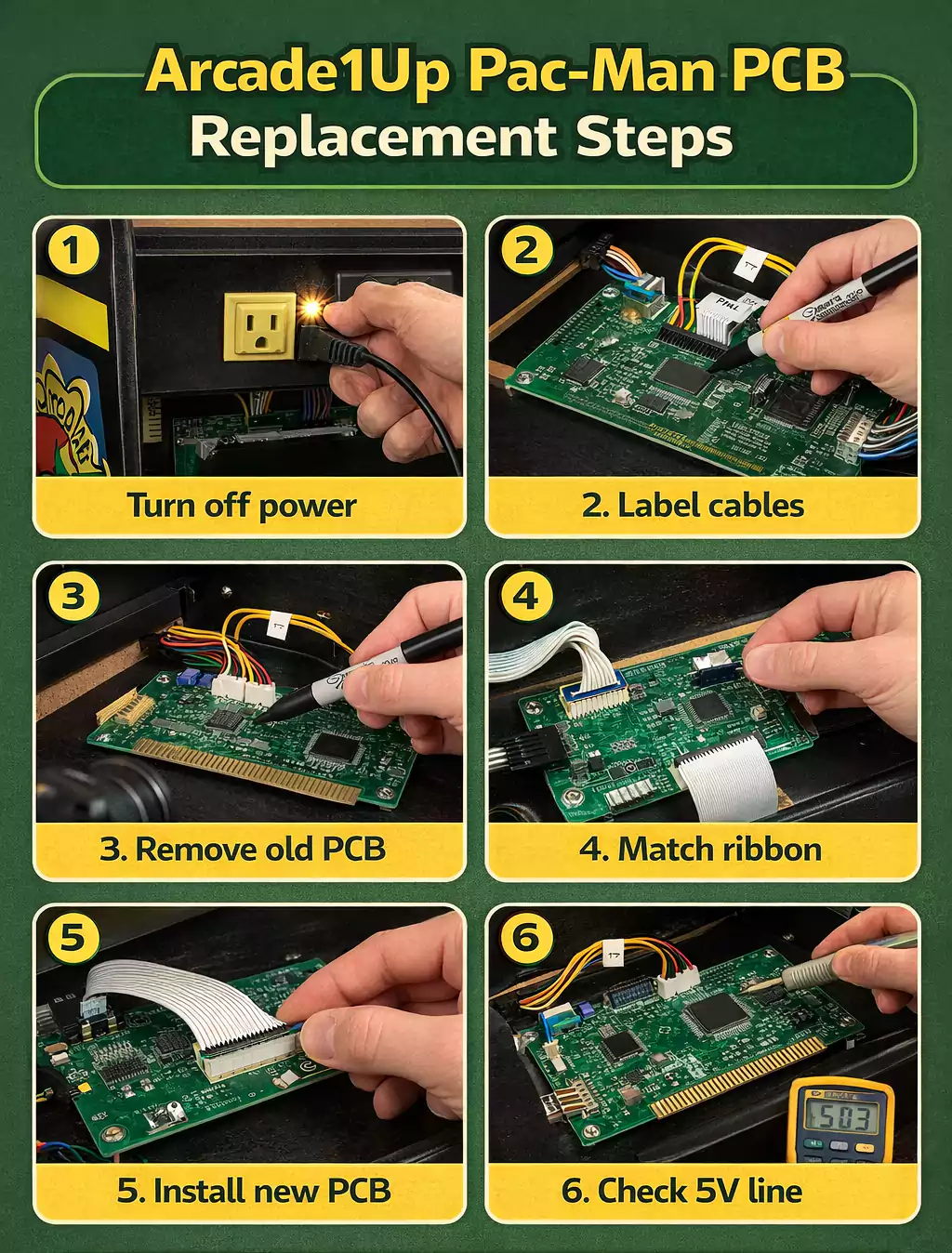
- Power supply issues: Test voltage with a multimeter before and after the edge connector.
- Prevent static and moisture: Store boards in anti-static bags, avoid damp locations, and periodically check for visible signs of damage.
After any board purchase, run basic power and input tests before full installation. Many issues can be caught early with a careful visual inspection and gentle cleaning.
Snapshot: Popular Arcade PCB Platforms
To help new enthusiasts, here are a few key arcade platforms worth knowing:
- Neo Geo MVS: Cartridge-based, supports dozens of SNK games. Great for entry-level collectors.
- Capcom CPS-2: Security chips, vivid graphics, classic fighters; needs regular battery changes.
- Taito F3, IGS PGM, Sega Naomi: Each with unique game libraries, modular designs, and varying levels of maintenance complexity.
Each has its own quirks, wiring needs, and collector community.
Legal and Compliance Notes
Reproducing or replacing arcade PCBs comes with responsibilities:
- Game software (ROMs) is protected by copyright. Only use ROM images if you own the original hardware or have legal rights to the game.
- Don’t distribute or download unauthorized ROMs. This guide does not provide links or encourage copyright infringement.
- Trademarked names and logos should not be reproduced for sale without permission. If in doubt, stick with personal, non-commercial use.
FAQ
Q: What’s the difference between JAMMA and “kick harnesses”?
A: JAMMA supports up to three (sometimes four) buttons per player. Games needing extra buttons (like Street Fighter) use an additional “kick harness” for the extra controls.
Q: Should I buy “untested” arcade boards?
A: Only if you’re comfortable troubleshooting and repairing. “Untested” often means “not working,” but can also be a way for sellers to avoid warranty claims.
Q: Should I buy an original board, a reproduction, or a multi-game PCB?
A: For authenticity and value, originals are best. For reliability and budget, reproductions or multi-games work well—just check for compatibility and possible compromises.
Conclusion
Arcade PCBs are the soul of every classic gaming machine. Whether you’re repairing an original, installing a replacement, or dreaming of building your own cabinet, understanding the basics of PCB compatibility, maintenance, and legal boundaries will save you time and money. The arcade community is full of resources—don’t hesitate to ask for help or share your own experiences.
Ready to keep classic arcade games alive? With the right prep and knowledge, you’ll keep your cabinets humming for years to come!